
about
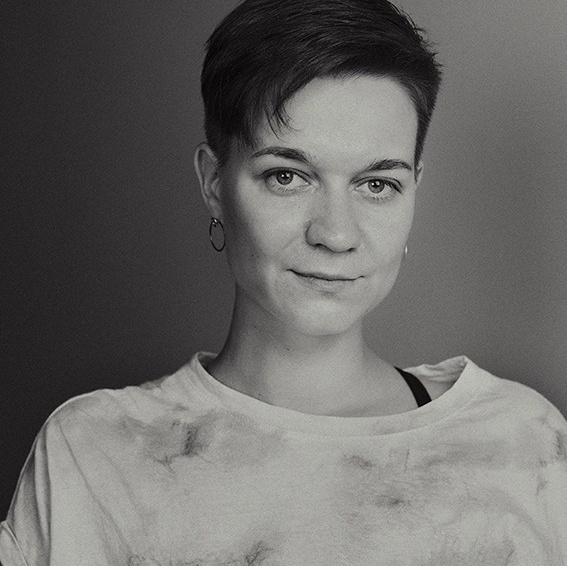
Marina has a background in visual arts and still photography, beginning as a teenager working as a lab technician in manual color darkroom printing, before developing her own conceptual projects and exhibitions.
She completed preparatory courses in cinematography at VGIK (the All-Russian State Institute of Cinematography) in 2006, where she gained practical knowledge of film stocks, lighting, cameras, and the principles of image capture in both analog and digital formats.
She later graduated from Warsaw Film School in Poland in 2015, deepening her understanding of cinematic storytelling, composition, and visual language. To this day, Marina continues her personal photography projects, exploring conceptual themes alongside her work in color grading.
Her approach to color grading is based on attentive listening: she analyzes the film’s rhythm, emotional tone, and subtext while carefully considering the director’s vision and intentions. Rather than imposing a personal style, she observes, asks clarifying questions, and shapes the look as a natural extension of the material.
Whether the project requires clinical precision, romantic warmth, raw naturalism, or bold stylization, her color work remains accurate, aligned with the emotional content, and fully in service of the story — enhancing without drawing attention away from it.
FAQ
Frequently asked questions from сlients and аnswers to them. If you have any remaining questions, feel free to message me on social media.
At what stage is it best to bring a colorist on board for a project?
There are two main ways to involve a colorist in a project, depending on the stage and budget.
The ideal scenario is to bring the colorist on board as early as possible – ideally during pre-production or test shoots. At this point, we can create on-camera LUTs for on-set monitoring, run tests with lighting setups, camera profiles, and locations. This helps establish a visual direction from the very beginning, ensures consistency across departments, and saves time and money later.
In practice, however, most projects now come to color grading only after the edit is complete or nearly complete. In such cases, there are still two practical approaches:
- We can start developing the overall look even during the rough cut / assembly phase, working with hero shots or selected sequences. This allows us to test ideas, refine the direction, and lock in a style before the final conform.
- Or we can wait until the final locked picture and do the full grade then – this is more budget-friendly, but leaves less room for experimentation.
Ultimately, the best timing depends on the project’s stage, schedule, and financial possibilities – the earlier we start, the more integrated and refined the result tends to be.
Are color references required before starting work on color grading?
No, it’s not strictly necessary.
Color references are more of a helpful starting point for communication and mutual understanding between colorist and the client (director and DP often).
They serve as an approximate direction or mood board rather than a blueprint to copy one-to-one. Trying to exactly replicate a reference often makes little sense – the lighting, location, skin tones, costumes and overall context are almost always different, and forcing an exact match can lead to the saddest outcome.
At the same time, references can be extremely useful and inspiring and they don’t have to be other films or stills from grading.
Paintings, photography, fashion editorials, album covers, vintage postcards, abstract art – anything visual that conveys the desired emotion, tone, contrast, saturation or feeling works perfectly.
It’s completely possible (and often more organic) to work without any pre-collected references at all. In that case we rely directly on:
- the footage itself,
- the story and emotional arc of the scene,
- the desired mood, atmosphere and vibe you want to achieve.
From there we can explore together: test different contrasts, tonal ranges, palettes, warmth/coolness balances and see what feels right for this specific material.
Many of the strongest and most authentic looks are born exactly this way – through dialogue with the image rather than imposition of an external template.
So short answer: references are welcome and helpful, but never mandatory. The most important thing is that the final grade feels true to the project and your vision.
Could you tell me about your setup?
I work in DaVinci Resolve with the Micro Panel. For monitoring I use a calibrated LG OLED C5 reference display. I chose OLED because it delivers perfect blacks, infinite contrast, accurate color reproduction in HDR/SDR, and excellent shadow detail – all of which are critical for judging subtle tonal shifts and skin tones without guesswork.
Favorite external tools include:
- Neat Video – outstanding noise reduction that cleans footage without smearing detail (I use it very often).
- Various grain plugins – to add organic texture and avoid a sterile digital feel.
- High-quality DCTLs with precise mathematical foundations – for custom contrast curves, gamut and tone mapping, film-like behaviors, and targeted adjustments.
- Selected film emulation tools – applied only when the project genuinely needs that analog character, always integrated carefully.
How long does color grading typically take for a project (e.g., a 5-minute clip / 30-minute video / feature film)?
It depends heavily on the footage quality, montage complexity, number of cuts, lighting consistency, matching needs, deadlines, and whether the edit is locked. Another key factor is my current project load – during busy periods with multiple projects, even smaller jobs may take longer due to scheduling.
I bill either by hours (small projects: ads, clips, shorts) or by days/shifts (larger ones).
Rough averages:
- 5-min clip/short: from 2-3 hours up tо 1-2 days.
- 30-min video: 2-3 days (typical for the YouTube video) to 1–2 weeks for complex material or short films.
- Feature film (90–120 min): 2–6 weeks; a couple of days is impossible for quality work.
Key factors that extend time:
- Unlocked edit → reconform, re-checks, extra reviews.
- Uneven lighting / multiple cameras → extensive matching.
- Graphics/VFX integration
- Many revision rounds.
The most accurate estimate comes after reviewing the edit and discussing goals. Send the footage, and we’ll give you a precise timeline and quote.
How should I prepare my material to save your time and my money?
To minimize extra work (and therefore costs), the key is to deliver a clean, locked timeline in a format that requires little to no reconforming or troubleshooting on my end.
Best practices for preparation:
- Provide a clean, single-track timeline (whenever possible)
- Keep the timeline simple: basic cuts, no unnecessary layers, effects, or complex compositing unless they must stay editable (e.g., specific VFX plates or graphics that need individual grading).
- This helps avoid manual fixes and frame-by-frame adjustments.
- If your project is already in DaVinci Resolve
- Almost no reconform needed from my side.
- Just send me the correct timeline (drt file).
- Make sure it's the final locked version. I’ll do a quick check to confirm I received the right cut (people sometimes send old versions by mistake).
- All your effects, transforms, etc. stay intact → this is the fastest and cheapest workflow.
- If your project is in Premiere Pro (or other NLEs like FCP, Avid)
- To save the most time and money, please reconstruct / recreate the final locked timeline directly in DaVinci Resolve before sending it to me.
- Export an XML (or AAF/EDL) from Premiere, import it into Resolve, rebuild the sequence there (fix any broken retimes, transforms, keyframes, scaling, audio sync, etc.), and then send me the cleaned-up Resolve timeline.
- Why this helps: Importing XML/AAF/EDL from Premiere causes elements to break or shift (speed ramps reset, masks/effects lost, transforms and keyframe lost). Fixing these manually in Resolve and checking that everything is in right place according to reference clip can take hours per version – and each reconform adds cost.
- If you rebuild in Resolve yourself, you handle the conform once, and I get a ready-to-grade sequence with everything already in place.
How to save the most time & money:
- Lock the edit and do the final conform in DaVinci Resolve if possible (you can do basic editing in a free version).
- Or, if you finish editing in Premiere, take the extra step to import XML/AAF/EDL into Resolve and rebuild the timeline there before sending.
- Always send the final locked single-track cut (no more changes planned).
- Include notes: which timeline is the master, delivery specs (Rec.709, HDR, etc.), and any reference files if needed.
Bottom line: A clean, locked timeline straight from Resolve (or properly conformed there) can cut preparation time by 50–80% and keep your costs low. Unclean imports or changing edits are the #1 reason projects become more expensive than expected.
If you send a clean, locked Resolve timeline from the start –reconform is typically zero or minimal. In other cases, I charge a fixed rate of €35 per hour for reconform work.
If you’re unsure how to prepare – just send a short sample clip or describe your workflow, and I’ll tell you exactly what format works best for us both.
How often do you work with indie cinematographers, young directors, and low-budget projects (short films, documentaries, debut features)?
Yes, quite often – whenever my schedule has available slots for such projects.
I genuinely love collaborating with indie filmmakers and emerging directors. As a visual artist myself, I deeply understand how crucial it is, especially at the beginning of your career, to find like-minded people who truly get your vision and are excited to explore it together. Indie projects usually bring fresh, bold ideas, a lot of passion, and the freedom to experiment, which is a refreshing break from more routine commercial work.
I enjoy the collaborative process: brainstorming looks, testing unconventional approaches, and helping shape the film’s emotional world through color. I’m quite friendly and approachable by nature, so these conversations are always open and enjoyable.
For indie, debut, and student projects, I don’t charge by the hour – I always quote a fixed price upfront. This way you know the exact cost from the very beginning and don’t have to worry about going over budget. I also offer a special student-friendly rate for film-school projects.
That said, please keep in mind:
- These collaborations depend on my current workload – I only take them when I have real capacity.
- I prefer generous timelines. Rush jobs (“needed yesterday”) are usually not a good fit for indie work, because haste tends to hurt the creative process and the final quality.
If your project has a thoughtful schedule, a clear vision, and room for real dialogue – I’d be very happy to talk. Indie cinema is where some of the most exciting and honest visual storytelling happens, and I’m always open to being part of that.
Feel free to send over your edit and I’ll take a look right away. I can then tell you if it fits my schedule, give you a realistic timeline, and quote a price. The duration and effort really depend on the cut, so seeing the material helps me give you the most accurate answer.
Please don't hesitate and feel free to reach out with your project – I look forward to hearing about it!